"[Rust] is an awful, awful, awful programming. When you subject humans to write it"
- David Heinemeier Hansson (Rails World 2026 Opening Keynote)
As a programmer and a motorsports fan, I have a lot of respect for DHH. But I think he might have gone a little bit off the rails (excuse the pun) at Rails World in his opening keynote. For those who haven't seen the clips, the whole keynote talked about his journey from a programmer into a vibe-coder, the lessons learnt along the way, and some of the products that have been built.

Photo: Lukas Raich, CC BY-SA 4.0, via Wikimedia Commons

One of the more inflammatory points he made, as a longtime Rust hater, was that Rust is a perfect language to target for LLM-generated code; however, humans should never read it. I've been flirting with the idea of seriously learning Rust for about a year now. I had a fleeting encounter during my undergrad degree, but never spent long enough with the language to gain a deeper understanding of the borrow checker and type system.
I have been a fan of strongly, statically typed languages since my first time trying Swift. One of my biggest pet peeves with languages like TypeScript and Python is exception handling. In my opinion, a language should always enforce the checking of possible error cases, rather than trusting a developer to catch them.
Given I had the perfect project to learn a new language with, and an outlet for my stubbornness to hand over the reins entirely to AI, this seemed like the prime opportunity to learn Rust and see if DHH is right about its verbosity. (Spoiler: he might be).
The Project
When learning a new language, some key pillars that are crucial to understand:
- Source code organisation, modules, dependencies, etc
- General language syntax
- Core control flow structures (if, for, while, match/switch)
- Exception handling
- Concurrency and thread safety
- HTTP API calls
- WebSockets
- File Manipulation
There are many more facets to each language, and every language is designed for different purposes. But ticking off each item on this list will give you a solid understanding of the language for most day-to-day work.
So what is the project that I have in mind? Well, I intend to work on some projects related to Polymarket, and its underlying market data in the future. Polymarket has a very comprehensive API for their data, with no costs or signup needed. This is very developer-friendly.
However, the issue is that this API is live-only. There is no way to get historical order book information for closed markets. To run comprehensive backtests, simulations or analysis, this data will need to have already been captured and stored.
Therefore, I need an application which is stable and efficient enough to run on my HomeLab, for months at a time, hoovering up all the data that Polymarket makes freely available.
Why A Data Archiver Is The Perfect Learning Project
Building this data archiver involves all of the key pillars I mentioned above. The API utilises both standard RESTful endpoints, alongside WebSockets for live CLOB order book data. The incoming data needs to be written to disk; connections to the API should be handled on multiple threads, which requires concurrency; deserialisation and file handling operations can always throw exceptions; and of course, building a project like this will require some dependencies and internal modules to organise code.
Hopefully then, you can see why this kind of project is ideal for learning a new language. Additionally, Rust provides other excellent benefits for an application with this use case. It is memory efficient with no garbage collector for runtime surprises, keeping its memory usage relatively flat; the WebSocket reader has a latency-sensitive fast path which is implemented well with message queues and async support through tokio; and it has great ecosystem support for CLI tooling, WebSockets, REST API calls, file handling, and more.
Development
LinkedIn will tell you that learning to code is dead. I'm here to prove it isn't.
I won't cover every aspect of the design and development process; that's not what this article is intended for. The code is available on GitHub for anyone interested in taking a look. What I do want to cover, though, are some of the approaches I took to learning a new language in a world that is obsessed with using LLMs for code generation.
Using AI As A Tool For Learning
I think the most important point I want to stress here is that you don't need to forgo AI when learning a new language. LLMs, while excellent for code generation, are also an excellent tool to help you learn when utilised correctly.
The most important part of learning is repetition. My goal with the project was twofold: learn Rust, and get a working data archiver application. Therefore, when I started, I told myself that I would write Rust by hand until I stopped relying on external resources to achieve a task. Given that I already have over a decade of programming under my belt, some aspects here would take less time than others.
But once I felt I understood how to achieve something in Rust, I allowed myself to use Claude Code again to speed up the application writing process. In the meantime, I would only be using Claude via the interactive chat as a pair-programmer ready to answer questions or explain a concept.
Getting a working hello world application in Rust was goal number one. I wanted a simple CLI tool which could parse an argument and use it in the program. What would have previously taken me multiple Google searches, a read of the quick-start guide on the docs, and a bit of trial and error was just one prompt away. Rather than just pasting the code and moving on, though, I took time to play with it, to get a feel for how clap works and how the basic syntax functions.
Sure, this process turned what would have been a two-minute task into thirty minutes of exploration, but this was a valuable trade-off to understand how the basics of a CLI work in a new language.
REST APIs and Knowing When To Stop
With a basic CLI up and running, the next plan of action was to use the Gamma REST API to retrieve open markets and their yes/no token IDs.
I first created a new module for this registry (source code organisation ✅), and wrote an object to hold the state. Time to make some API calls. I utilised quicktype, an excellent resource for quickly producing type-safe boilerplate for deserialisation of JSON objects, to produce my response structs; then set about writing my first HTTP request in Rust.
After a lot of conversations with Claude, explaining how different aspects of Rust work, I had my first working API call. I had learnt a lot and my understanding of borrow-checking, lifetimes, and Rust syntax had improved drastically.
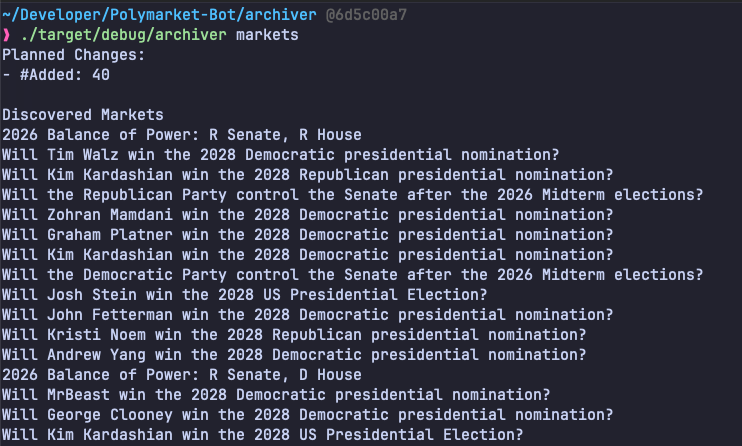
It was at this point I pivoted from a learning focus to a practical outlook on the project. There would be many more API calls to Polymarket, and the idea of hand-rolling each one did not fill me with joy (uh-oh, was DHH right about Rust?).
Conveniently, around this time, Anthropic decided to be nice by giving everyone $100 of Claude Code Cloud (say that fast five times). I decided to pull each page of the API docs that Polymarket serves as markdown files (please can we make this common practice), and pass them to Claude. Utilising dynamic workflows, multiple agents worked tirelessly overnight building marcasite for me.
Marcasite is an unofficial Rust SDK for communicating with Polymarket's APIs.
This is exactly the kind of task that LLMs excel at doing unsupervised. The documentation is explicit in each parameter that an endpoint accepts, the shape of the response, error cases, and what each endpoint does. Using dynamic workflows allowed the work to be split up intelligently among sub-agents, with each one working on a different aspect of the API.
With this Rust crate published to crates.io, I prompted Claude Code to replace my hand-crafted implementation of calling the API with the marcasite implementation.
You might be looking at this thinking, what the hell was the point of wasting your time writing that code by hand in the first place? But remember that this project is both a learning experience and something I want to get built and deployed. Sure, I replaced all of that code with LLM-generated ~~slop~~ code, but the lessons I gained writing it myself first are worth it.
Progressing The Rest Of The Codebase
The rest of the application was built up in a similarly to what I just described. New aspects of the language were written by hand (such as WebSockets) and then offloaded to AI once I felt I had a solid understanding of what was going on.
One pattern I utilised in particular for implementing WebSockets was to prompt AI to produce all the skeleton and boilerplate code, and leave a todo with an empty implementation for the thing I actually wanted to learn.
This worked extremely well as it was like being given an assignment to complete. I had all the connections to the rest of the program built, the API was declared, and all I needed to do was implement the thing I cared about. This gives the added benefit of prompting AI to "mark your work". Ask it to review your implementation, and it can point out bugs, edge cases, or simpler ways to achieve the same thing. This feedback loop, through Claude Code and the chat interface, was another excellent way to accelerate learning of best practices and common, language-specific patterns.
Was DHH Right?
Partially. After writing my fair share of Rust by hand, the language verbosity does start to wear you down. Obviously, tooling such as LSPs mellows this slightly, but there is no getting away from the fact that you have to write many more characters to achieve the same thing as other languages.
However, this is a tradeoff, as are all engineering solutions. Yes, you write a lot more verbose code, but the benefit is the compile-time checking Rust can do. A whole class of memory bugs and exploits are removed, concurrency is safe by default, memory is utilised efficiently, and the compiled binary is tiny.
So yes, DHH is right that Rust is a good target for LLM code generation, but so are most statically-typed languages. Rust just happens to be the most extreme example of the benefits you can gain.
However, DHH and I still disagree on the need to be able to code. Nothing will change my opinion that the best developers ten years from now will be the ones who continue learning, continue writing code by hand, and continue staying curious. AI is a revolutionary tool. Anyone can produce a working application with plain English; not everyone should, though.
For "serious" software- I'm talking mission-critical (be that financial, systems control, high traffic, or whatever other definition you want to give)- a software engineer with solid fundamentals in Computer Science theory and years of experience building and maintaining large codebases is still far more valuable than your average Joe with Claude and a dream.
Throughout history, better tooling has not replaced the need for a skilled worker. A layman will never produce an objectively better result than an expert using the same tools, no matter how advanced they are.
If you had to get on a rocket and fly to the Moon tomorrow, would you get on the rocket whose software was vibe-coded by a university dropout, or the rocket whose software was designed and reviewed by experienced NASA rocket scientists?