I have trust issues. I have long been reluctant to allow AI control over machine, especially when running unsupervised. I have watched as my peers in the software engineering community have given over all control to these agents, with little regard for basic safeguarding. Much like the snake whispering in the ear of Eve in the Garden of Eden, the fruit, or in this case productivity gains, was too irresistible for them to ignore.
In the past year I have loosened my stance somewhat: a strong deny and allowlist in Claude Code, for example, helped me feel better. But I have not yet taken the leap into auto-mode or bypass permissions. This was, in my opinion, a step too far for code execution onto my machine.
We are obsessed with reports over CVE-9 vulnerabilities, allowing remote code execution via whichever open-source project is (un)lucky enough to be poked and prodded by Mythos, but we never stop to consider that we are actively allowing code execution with little-to-no oversight via LLM harnesses.
However, not wanting to fall behind my peers, I recently decided to embrace agentic programming with open arms. But, before entering into this marriage of robot and human, a prenup was needed. I had my demands, but I was willing to compromise on the emergency jug of water next to my laptop in case an agent goes rogue.
Goals and Restrictions
- [ ] Autonomy - Enable Claude Code to run in auto-mode, or fully autonomously in headless instances
- [ ] Attribution and Provenance - I want to easily distinguish between code I have written (either by hand or assisted via an LLM), vs purely agentic work.
- [ ] Access Control to GitHub - LLMs should not, in any way, be able to get code onto the main branch without human approval.
- [ ] Sandboxing - I am not about to grant access to my entire system for some rogue AI to get its grubby mitts on my personal data
With some goals and restrictions in mind, let me set out the key problems I faced, in achieving a setup which satisfies these constraints.
Attribution and Provenance
The key goal here is to be able to clearly identify which code I have written by hand, or through the use of Claude Code in a more supervised manner, versus the code which has been produced fully agentically by an LLM. This is somewhat of the easiest thing to solve, and gave me the perfect excuse for buying a new toy.
A few months ago I first discovered commit signing with Git. After following a few articles online, I setup a system I was happy with, which used PGP to sign commits I made on my machine as being written by me.
After adding the public key to my GitHub profile, my commits began to show as verified.
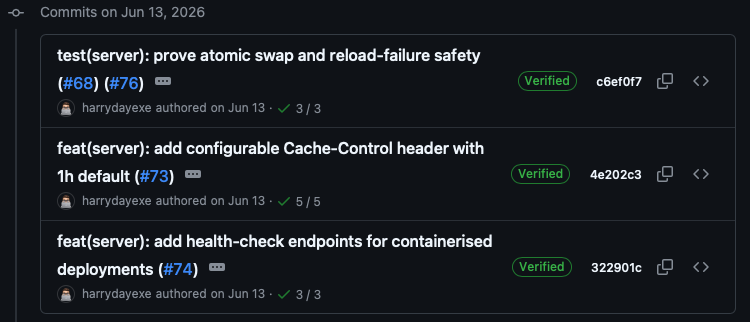
While this system worked well for my usage at the time, I quickly realised that any commits produced by Claude would also be signed by my key. There was nothing stopping that key from being accessed by a program on my machine. This somewhat defeats the point of code authenticity, anyone with access to my laptop would be able to produce commits and have them verified by GitHub as being mine.
Whilst the simple solution here would be to lock the private signing key behind a passphrase, I saw a perfect opportunity to spend some money. Enter YubiKey (not sponsored). If you haven't encountered a YubiKey, or, for that matter, any physical hardware key, it's a small USB security device that stores cryptographic keys in its hardware. This is the same idea as "cold wallets" (ie Trezor) for crypto. The key never leaves the device, your computer sends the data to be signed to the YubiKey, the device signs the data using the private key and sends it back to your computer.
My variation also requires a pin entry before signing, and a physical touch of the key before any data is signed. This fits my needs perfectly: for one, no LLM will ever be able to sign a commit without me touching the key; and two, even someone who gains access to both my laptop and the key still can't sign a commit without my pin. Two birds with one ($60) stone.
YubiKey Setup
Setting up the YubiKey and generating a FIDO2 key-pair is simple enough. In my case, I opted to go for a ed25519-sk type SSH key. Whilst this can be the same key you use for SSH, Yubico recommends against it.
ykman fido access change-pin

ssh-keygen -t ed25519-sk -O resident -O verify-required -C "Git signing key $(git config user.email)" -f ~/.ssh/id_ed25519_sk_git_signing
The parameter -O resident ensures that the key handle (a reference to the actual private key on the YubiKey) is stored on the key itself, as well as being copied to your machine (into the id_ed25519_sk_git_signing file). This allows you to plug the key into a fresh machine and run ssh-keygen -K to pull the handle off the device and start using it on the new machine.
Note that the key handle is useless without the actual YubiKey, as it is itself an encrypted form of your private key, which only the YubiKey's master private key can decrypt.
The other important parameter to note is -O verify-required which forces a physical touch of the YubiKey before a request can be signed.
Due to my YubiKey being pin-protected, I needed a way for SSH to get the pin when signing commits. This setup has only been tested on MacOS, so your mileage may vary on Linux/Windows.
I first created a small script which creates a small pop-up to get my pin:
#!/bin/bash
#~/bin/ssh-askpass.sh
if [[ "$1" == "Confirm user presence"* ]]; then
    echo
else
    PROMPT=$(echo "$1" | sed 's/"/\\"/g')
    PIN=$(osascript -e "text returned of (display dialog \"$PROMPT\" default answer \"\" with hidden answer with title \"SSH Key PIN\")" 2>/dev/null)
    echo "$PIN"
fi
And then configured SSH to use it in my ~/.zshrc:
export SSH_ASKPASS=~/bin/ssh-askpass.sh
export SSH_ASKPASS_REQUIRE=force
export DISPLAY=":0"
For a more detailed look into my setup, feel free to check out my dotfiles repo for all my config.
With this in place, we can now set our Git config to start using the YubiKey:
[user]
    signingkey = ~/.ssh/id_ed25519_sk_git_signing.pub # Points to your new key
[commit]
    gpgSign = true # Enable signing of commits
[gpg]
    format = ssh # We are using an SSH type key
[tag]
    forceSignAnnotated = true # Also recommended to sign annotated tags
You can also add an allowed signers file which is useful if you want to verify commit signing locally. This maps user emails to public keys.
Claude Commits
This raises a problem, any commit on our machine, now requires a touch on the YubiKey. If we want Claude to be able to commit code as it goes, this now doesn't work. My first instinct to solve this problem was to reach for a tool I have used before.
When I have worked for companies previously, I would commit code using my company email, rather than my personal one. In order to achieve this, I would use Git's includeIf config option, to conditionally include a different git config file depending on the directory.
[includeIf "gitdir:~/work/"]
    path = ~/.gitconfig-work
This allowed me to override some settings in my config, for any repo stored under ~/work/. For this case, it would allow me to disable all the config items related to signing that I showed above, for work in an ~/agentic/ directory.
As I will explain later in this article, this wasn't ultimately the method I went for, but depending on how anal you want to be about trusting AI, this may be the solution you require.
Access Control to GitHub
The second issue to tackle is the question of GitHub access. Currently, I use SSH keys to communicate via Git (using a similar YubiKey setup as above). The problem with this, similar to signing commits, is that this requires a physical touch. SSH keys also give full access to all repos, with no opportunity to restrict which repos they have access to.
I considered utilising a GitHub app, and I still may go down this route in the future, however for now I have decided to just utilise a fine-grained Personal Access Token (PAT). Whilst the permissions system here still leaves a little to be desired (only options are read-only, or read and write access), it is workable.
The reason that read-only, or read and write could be improved can be seen in Pull Requests. For example I would like to be able to give a PAT the ability to read and create pull requests, but not approve and merge them. Currently this is not possible (see here)
Due to the aforementioned problems with the permissions system, I have a few notes on where I would like to take this setup in the future, which will be included at the end of this article.
Sandboxing
This is the real meat and potatoes here. While cryptography and signing commits is extremely interesting, sandboxing is what provides the protections I am actually looking for.
I considered a few different methods for this, one was to use a VPS to run Claude Code on, a second was a VM on my own machine, but then I ran across this page on the Anthropic docs.
The suggested implementation was to use a devcontainer, running on your local machine, to sandbox agentic work. This keeps the config and settings for the more agentic flavour of Claude Code separated from my current setup, which I am happy with for supervised work.
The key thing to keep in mind here, is what does the agent have access to inside the sandbox. All of the config for the devcontainer itself lives in a separate directory to the workspace, where the repos being worked on live, which is mounted into the container.
This ensures that Claude Code cannot rewrite its own rules. This does require two file paths to be written in each command to start or connect to the devcontainer, however this was mitigated through the use of zsh functions.
If you want a full in-depth look at my configuration, the repo is available on my GitHub harrydayexe/agentic-container-config. This is a work in-progress still but it's at a point where I am actively using it daily.
Config
├── .devcontainer
│   ├── agentic-firewall.sh
│   ├── devcontainer.json
│   ├── Dockerfile
│   └── managed-settings.json
├── .gitconfig.agentic
├── .gitignore.agentic
└── claude
    ├── .mcp.json
    ├── CLAUDE.md
	└── settings.json
The first step to setting up this devcontainer, is writing the configuration files which will be used inside it. The first is the Git config file. This is mostly a mirror of my current Git config, but without the commit signing things I added previously. This is why I did not need to go down the [includeif] route.
There is an important addition to the Git config, and the secret to making the Git connectivity work, without needing my own authentication token, with full access to the API.
[credential "https://github.com"]
	helper = !gh auth git-credential
This tells Git to use the GitHub cli to authenticate, rather than an SSH key. It's not baked into the config of the container, and can be easily rotated.
The second step is to configure Claude Code. There are two sections here. The managed-settings.json and the general claude directory. The former is for policy rules which I don't want to change, and the general configuration that changes day to day goes in the claude/ directory.
My managed-settings.json can be seen below. The key things to note here are the defaultMode, this is bypassPermission for headless execution. The deny list acts as a soft guard against things I do not want the agent to do. Anthropic is clear that this is not bullet-proof, but it blocks most things, as long as they match the pattern. It's not fool proof though, and this is something I will address later in my plans for the future.
Finally the allowManagedPermissionRulesOnly and disableBypassPermissionsMode are both set to ensure that a repo's settings.json cannot override the defaults I have set.
{
  "$schema": "https://json.schemastore.org/claude-code-settings.json",
  "permissions": {
    "defaultMode": "bypassPermissions",
    "deny": [
      "Read(//home/vscode/.claude/**)",
      "Read(//home/vscode/.gitconfig.agentic)",
      "Read(//etc/claude-code/**)",
      "Read(**/.env)",
      "Read(**/.env.*)",
      "Read(**/secrets/**)",
      "Read(**/id_rsa*)",
      "Bash(sudo *)",
      "Bash(gh auth *)",
      "Bash(gh secret *)",
      "Bash(gh pr merge *)",
      "Bash(gh pr review *)",
      "Bash(gh pr close *)",
      "Bash(gh api *)",
      "Bash(gh alias *)",
      "Bash(gh extension *)",
      "Bash(gh repo edit *)",
      "Bash(gh ruleset *)",
      "Bash(gh workflow run *)",
      "Bash(gh release *)",
      "Bash(gh variable *)",
      "Bash(curl *)",
      "Bash(wget *)"
    ]
  },
  "allowManagedPermissionRulesOnly": true,
  "disableBypassPermissionsMode": "allow",
  "disableClaudeAiConnectors": true,
  "env": {
    "DISABLE_AUTOUPDATER": "1",
    "DISABLE_TELEMETRY": "1"
  },
  "cleanupPeriodDays": 7
}
Dockerfile
The Dockerfile isn't anything special, it installs a few packages I want, and copies in the files that I want baked into the image, not mounted from the host system:
FROM mcr.microsoft.com/devcontainers/base:ubuntu

RUN apt-get update && apt-get install -y --no-install-recommends \
      iptables ipset dnsutils jq ripgrep vim just \
    && rm -rf /var/lib/apt/lists/*

# Organization-style policy the agent cannot override from repo files
RUN mkdir -p /etc/claude-code
COPY managed-settings.json /etc/claude-code/managed-settings.json

# Egress firewall, runnable by the non-root user at container start
COPY agentic-firewall.sh /usr/local/bin/agentic-firewall.sh
RUN chmod +x /usr/local/bin/agentic-firewall.sh \
 && echo "vscode ALL=(root) NOPASSWD: /usr/local/bin/agentic-firewall.sh" \
      > /etc/sudoers.d/agentic-firewall
The important thing here is that the managed-settings.json is copied into the location that Claude expects.
The other thing to note is the firewall configuration. This is mostly copied from the example Anthropic shows in their docs here. This is the area that is still a work-in-progress. The firewall currently denies Go modules from being downloaded, which for me is a big blocker. I have found a workaround by mounting my host system module cache into the image, but this is still less than ideal, as the agent cannot download a new module itself. Something to work on in the future.
Devcontainer Definition
{
  "name": "agentic",
  "build": { "dockerfile": "Dockerfile" },
  "remoteUser": "vscode",

  "workspaceFolder": "/workspace",
  "workspaceMount": "source=${localEnv:HOME}/Developer/agentic/workspace,target=/workspace,type=bind,consistency=cached",

  "features": {
    "ghcr.io/devcontainers/features/node:1": {},
    "ghcr.io/devcontainers/features/github-cli:1": {},
    "ghcr.io/devcontainers/features/go:1": {},
    "ghcr.io/anthropics/devcontainer-features/claude-code:1.0": {}
  },

  "mounts": [
    "source=${localEnv:HOME}/Developer/agentic/config/claude,target=/home/vscode/.claude,type=bind",
    "source=${localEnv:HOME}/Developer/agentic/config/.gitconfig.agentic,target=/home/vscode/.gitconfig.agentic,type=bind,readonly",
  "source=${localEnv:HOME}/go/pkg/mod,target=/home/vscode/go/pkg/mod,type=bind"
  ],

  "containerEnv": {
    "CLAUDE_CONFIG_DIR": "/home/vscode/.claude",
    "GIT_CONFIG_GLOBAL": "/home/vscode/.gitconfig.agentic",
    "DISABLE_AUTOUPDATER": "1",
    "EDITOR": "vim",
    "VISUAL": "vim"
  },

  "remoteEnv": {
    "GH_TOKEN": "${localEnv:AGENTIC_GH_TOKEN}"
  },

  "runArgs": ["--cap-add=NET_ADMIN", "--cap-add=NET_RAW"],
  "postCreateCommand": "go install golang.org/x/vuln/cmd/govulncheck@latest && sudo /usr/local/bin/agentic-firewall.sh"
}
This is where the definition for devcontainer lives. It's a pretty standard setup, with the key things to note being the mounts, and environment variables. For mounts, I have the git config mounted as readonly, so that claude cannot update its identity.
The PAT token I spoke about earlier in the article, for communication with GitHub, is set up in GH_TOKEN environment variable. This allows the GitHub cli to authenticate with GitHub, and also, due to the Git config, allows for communicate via HTTPS using this token.
ZSH Functions
The final key to this puzzle, is a few convenience functions I have added to my ~/.zshrc:
# Agentic Workflow
AGENTIC_WS=~/Developer/agentic/workspace
AGENTIC_CFG=~/Developer/agentic/config/.devcontainer/devcontainer.json

agentic-token() {
  security find-generic-password -a "$USER" -s agentic-gh-token -w 2>/dev/null \
    || { print -u2 "agentic: token not in keychain"; return 1; }
}

agentic-up() {
  local -x AGENTIC_GH_TOKEN
  AGENTIC_GH_TOKEN="$(agentic-token)" || return
  devcontainer up \
    --workspace-folder "$AGENTIC_WS" \
    --config "$AGENTIC_CFG" \
    "$@" \
    || { print -u2 "agentic: setup failed — container NOT firewalled"; return 1; }
}

agentic-down() {
  local ids
  ids=$(docker ps -aq --filter label=devcontainer.local_folder="$AGENTIC_WS")
  if [ -z "$ids" ]; then
    print "agentic: nothing running"
    return 0
  fi
  docker rm -f ${=ids}
}

agentic-restart() {
  agentic-down && agentic-up
}

agentic() {
  local -x AGENTIC_GH_TOKEN
  AGENTIC_GH_TOKEN="$(agentic-token)" || return
  if [ $# -eq 0 ]; then
    devcontainer exec --workspace-folder "$AGENTIC_WS" --config "$AGENTIC_CFG" zsh
  else
    devcontainer exec --workspace-folder "$AGENTIC_WS" --config "$AGENTIC_CFG" "$@"
  fi
}
I stored the PAT that I generated on GitHub in my MacOS keychain. This means that I do not have to leave it sat in a file on disk somewhere, and can pull it out with a simple command in each script. This is the final piece of the puzzle for connecting up the sandbox to GitHub.
Pitfalls Along the Way
There were a few things that caught me out along the way, and hopefully by reading this article, you might save a few hours of debugging.
The first is that the claude-code devcontainer comes with its own init-firewall.sh. Devcontainer features run after the Dockerfile, and so it was overwriting my own firewall setup. This is why I ended up switching the filename to agentic-firewall.sh, to be sure it was my own script that was running.
The second thing is that the default init-firewall.sh that I copied from Anthropic doesn't handle duplicates well. api.anthropic.com and claude.ai resolve to the same IP. The stock script's domain list never collides, so the bug wasn't visible until I made my changes. Adding the -exist flag to ipset add was a simple fix.
Similarly, the Go feature runs after the Dockerfile is built, and so I couldn't run go install commands in the Dockerfile. The easy fix for this was to move it into the postCreateCommand.
Conclusion
Overall I am happy with this setup. I am now much more comfortable with letting Claude run unsupervised; either with automode deciding what commands are allowed, or in bypass permissions mode.
I think this is a much more responsible way to limit the damage that Claude, or any LLM is able to do if it gets caught up in the wrong thing. The blast-area is limited only to the devcontainer and non-main branches on Git (enforced through the normal branch rules). If anything goes wrong I can simply rebuild the container and start again.
Future Work
Whilst I am happy with the setup, there are a few things I want to improve. Firstly, the PAT having the ability to merge PRs is not ideal. One way to get around this is to let a deterministic program outside of the container create the PRs, and therefore be able to set the AI GitHub token to be read-only on PRs.
Similarly, I want to develop a simple script which will allow me to process GitHub issues on some of my projects overnight. Without getting into too much detail here, I'll save it for another blog, Claude token limits operate on 5 hour windows. Overnight, I am losing out on a couple of windows that go potentially unused. This could instead be utilised by performing small fixes and feature requests. The program would be responsible for queuing up issues to work on, passing the prompt to headless claude instances in the container, monitoring execution, waiting for CI runs, etc.
I have seen some other tools which achieve the same thing, but most look far more complicated than what I need, and this gives me a good opportunity to brush up on my Rust skills by writing a new CLI tool.
If you enjoyed this blog, feel free to check out my GitHub to see some more of my work, or read some of my other articles on this site!
Update: Improved Networking
With the setup I originally described, there was one problem which I glossed over. Keen-eyed readers may have spotted the mount to my host Go module cache. This was a hacky workaround to a self-inflicted problem: my network firewall allowlisted by IP address, not by hostname.
At container start, the firewall script digs each allowed hostname, and then put the returned IPs into an ipset to be allowed, while dropping all other ranges.
The reason that this works for github.com for example, is due to GitHub publishing their static IP ranges for anyone to consume. GitHub uses stable API endpoints, so the IPs wouldn't keep getting swapped out from under the firewall's feet.
However, proxy.golang.org, or indeed registry.npmjs.org, or many other package managers, all live behind CDNs with large, rotating address pools. Running dig at startup captures the current snapshot of IPs, a fraction of the overall pool. By the time that anything reaches out to the address, the IP might have changed, causing connections to be denied.
More subtly, allowing an IP for a CDN edge also allows that IP for any host that connects through the VPN. The next person to use the current proxy.golang.org IP, might be a malicious actor.
Fixing Things Properly
The fix is a simple enough one. We need a way to lock down by default, but occasionally allow egress to certain package manager domains. The solution: run a Squid proxy which allows access to a set of hostnames. This removes the problem of rotating IP address pools, as the Squid proxy resolves this at call-time.
The container now egresses through a Squid proxy bound to 127.0.0.1:3128, with the policy split in two:
- The kernel decides who may talk to the internet.
OUTPUTpolicy isDROP, and only the uid Squid drops to may open ports 80/443 or make a DNS query.ipsetis gone. - The proxy decides where .
squid.confholds the domain allowlist.
HTTP_PROXY and HTTPS_PROXY are set in containerEnv allowing every tool to pick them up without special cases. And because the kernel-level rule is about uid and not just the environment variable, an agent that unsets HTTPS_PROXY doesn't escape the allowlist, it just loses network access.
The unexpected bonus is every request proxied through Squid is logged. This allows complete oversight on what an agent has connected to while running unsupervised, if the need ever arises for a deep investigation.
After arriving at this new setup, my first question was how would a malicious agent escape it? Despite taking care to ensure the right user permissions were set on important proxy configuration, the devcontainer I was building on top of allowed the vscode user to become root with sudo, effectively undoing all the hard work. A quick change to the sudoers list fixed this issue for good.
The biggest takeaway from this exercise for me is this: always treat agents as smarter than you. Even if they are not right now, one day they very well may be. The best line of defence is not what I like to call "suggestion configs", where we rely on a basic form of pattern matching to deny commands. Instead we need the same OS-level protections we rely on to reduce the impact that malware can have. Instead of simply running a few commands to gain root access, an agent would instead have to find, and exploit, a critical vulnerability in both the sandbox, and the virtualisation layer, in order to gain access to the host system.
Remember that the forbidden fruit is kept locked in the Garden of Eden for a reason.